Your PDFs contain sensitive information—tax returns, contracts, medical records, and personal IDs. Yet millions of people still upload these files to cloud-based tools that store, process, and potentially expose their data. Browser PDF tools change this equation entirely by keeping your documents on your device, where they belong.
This guide explains why browser-based PDF tools offer superior privacy, how the technology actually works, and what to look for when choosing a privacy-focused PDF editor. Whether you’re a freelancer handling client contracts, a student submitting applications, or a business processing confidential documents, understanding this distinction could protect you from the next major data breach.
The Hidden Privacy Problem with Traditional Online PDF Tools
Most free online PDF tools work the same way: you upload your file to their server, wait for processing, then download the result. This workflow creates multiple privacy vulnerabilities that most users never consider.
When you upload a PDF to a server-side tool, your file temporarily lives on someone else’s infrastructure. That means:
- Server storage: Your document sits on a server, even if “temporarily”
- Database exposure: Files can be logged, indexed, or retained in backup systems
- Third-party access: Cloud providers often use subprocessors who may touch your data
- Breach risk: Any server storing your files becomes a target for hackers
- Employee access: Staff at the tool provider may have technical ability to view uploaded files
The November 2025 jsonformatter.org breach illustrates this perfectly: a server-side tool leaked 5GB of API keys and user data because files were processed remotely. The same architecture powers most “free” PDF converters, compressors, and editors online.
Even tools with good intentions face structural risks. Misconfigured storage buckets, accidental logging, or compromised employee credentials can expose your documents. Over 60% of free PDF tools have vague deletion policies, making it impossible to verify whether your files are truly removed.
How Browser PDF Tools Work Differently
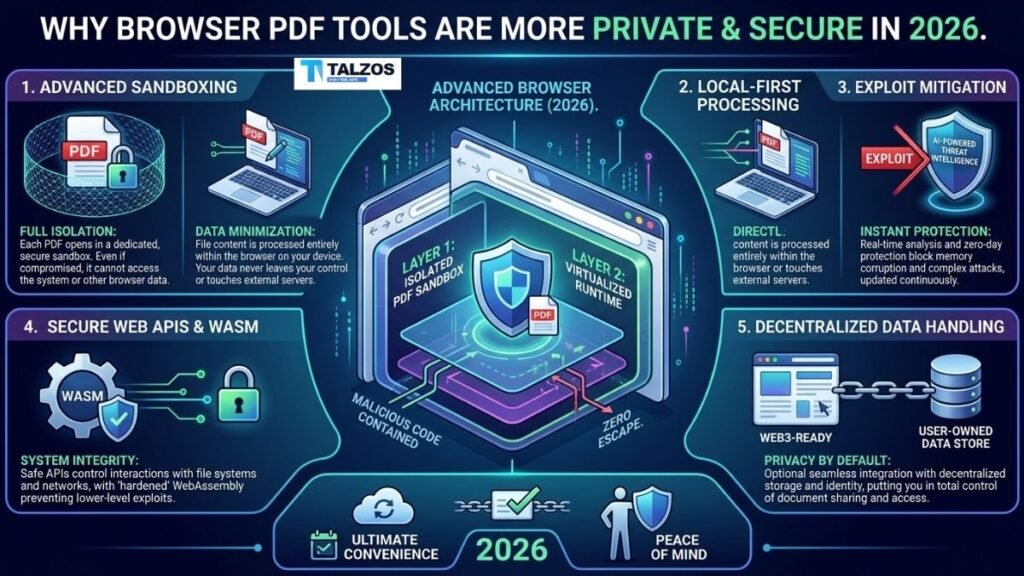
Browser PDF tools flip this model on its head. Instead of uploading your file to a remote server, the tool downloads its processing libraries to your browser once, then runs everything locally on your device.
Here’s the technical flow:
- You visit the browser PDF tools website
- JavaScript and WebAssembly libraries load into your browser’s memory
- You select a PDF file from your computer
- The File API gives the page read access—but the bytes stay in browser memory
- Processing happens entirely via JavaScript or WebAssembly running on your CPU
- The output downloads as a blob URL from local memory
- No network request ever carries your document data
The server only serves the webpage itself—HTML, CSS, and the processing libraries. Your actual PDF never leaves your device. If you turned off your Wi-Fi mid-task, the tool would still work because everything runs locally.
This architecture is called “local-first” or “client-side” processing. It’s the same security model as desktop software, but delivered through the convenience of a website.
The Privacy Advantages of Browser-Based Processing
The privacy benefits of browser PDF tools aren’t just marketing claims—they’re architectural guarantees built into how the technology works.
Zero Data Transmission
With browser PDF tools, your file never travels across the internet. No upload means no network packets containing your document content. This eliminates:
- Interception risks during transit
- ISP logging of file transfers
- Government surveillance of uploaded content
- Cross-border data transfer complications under GDPR and similar laws
No Server-Side Copies
Since processing happens in your browser’s RAM, there’s no server copy to breach, misconfigure, or accidentally retain. The attack surface for your file collapses to zero. Even if someone wanted to access your documents, they couldn’t—because the files never exist on any server.
Browser Sandbox Security
Modern browsers are among the most secure sandboxed environments ever built. Each tab runs in isolation, preventing malicious code from accessing other tabs or your filesystem beyond what you explicitly select. This sandbox:
- Restricts file access to only what you choose via the File API
- Prevents persistent storage without permission
- Blocks cross-site data leakage through strict origin policies
- Receives continuous security updates from browser vendors
No Account Tracking Required
Most browser PDF tools don’t require accounts for basic tasks. This means:
- No identity tied to your document content
- No behavioral tracking across sessions
- No profile building from your usage patterns
- No email addresses linked to sensitive files
Regulatory Compliance by Design
Because data never leaves your device, browser PDF tools sidestep many regulatory headaches. There’s no data transfer to regulate, no storage jurisdiction to worry about, and no third-party subprocessors to audit. For businesses handling GDPR, HIPAA, or CCPA-covered data, this architecture simplifies compliance significantly.
What Browser PDF Tools Can Actually Do
A common misconception is that browser-based tools are limited to simple tasks. That was true five years ago. Today, WebAssembly and modern JavaScript engines can handle virtually every common PDF operation locally.
Browser PDF tools now support:
- Merging and splitting: Combine multiple PDFs or extract pages
- Compression: Reduce file sizes without server processing
- Conversion: Convert PDFs to Word, Excel, images, and vice versa
- Editing: Add text, images, annotations, and form fields
- Signing: Add digital signatures and e-signatures
- OCR: Optical character recognition for scanned documents
- Password protection: Encrypt PDFs with AES-256 locally
- Redaction: Permanently remove sensitive content
- AI features: Chat with documents, summarize, and extract data—all locally
The performance is often faster too, since there’s no upload/download latency. A 50MB PDF that would take minutes to upload and process on a cloud service completes in seconds when processed locally.
How to Verify a Tool Actually Runs Locally
Not every tool claiming to be “browser-based” actually processes files locally. Some use the label while still uploading files to servers. Here’s how to verify before you trust a tool with sensitive documents:
Check for Explicit Privacy Language
Look for clear statements like “files never leave your device” or “processed locally in your browser” on the tool’s homepage—not buried only in Terms of Service. Reputable browser PDF tools make this their primary value proposition.
Test the Offline Capability
Load the tool, then disconnect from the internet. If you can still select and process files, it’s genuinely running locally. Server-dependent tools will fail or show errors when offline.
Monitor Network Traffic
Open your browser’s Developer Tools (F12), go to the Network tab, and use the tool. If you see no large uploads when processing a PDF, the file isn’t leaving your device. Legitimate browser PDF tools show only small requests for the page itself and libraries—never your document content.
Review the Privacy Policy
A proper privacy policy for browser PDF tools should state:
- No file uploads for core features
- No retention of document content
- No third-party access to processed files
- Clear distinction between analytics (page views) and document data
Look for Open Source Libraries
Many browser PDF tools use open-source libraries like PDF.js, pdf-lib, or WebAssembly-based engines. Tools that transparently list their tech stack are more trustworthy than those hiding behind proprietary claims.
Real-World Scenarios Where Browser PDF Tools Matter
Understanding the theory is useful. Seeing practical applications makes it essential.
Legal and Contract Work
Lawyers, paralegals, and freelancers regularly handle contracts, NDAs, and client documents. Uploading these to server-side tools creates unnecessary exposure. Browser PDF tools let you merge, sign, and redact without ever transmitting sensitive legal content.
Healthcare and Medical Records
HIPAA-covered entities must protect patient information. Browser PDF tools processing locally eliminate the risk of PHI exposure through server breaches or misconfigured cloud storage.
Financial Documents
Tax returns, bank statements, and investment records contain data that identity thieves prize. Processing these locally means no server copy exists to leak in the next breach.
Government and Compliance
Agencies handling classified or sensitive-but-unclassified documents can’t risk cloud exposure. Browser PDF tools provide desktop-level security with web accessibility.
Academic and Research Data
Researchers working with unpublished findings, grant applications, or peer reviews need confidentiality. Local processing ensures their work doesn’t leak through third-party tools.
Personal Identity Documents
Passports, driver’s licenses, and Social Security cards are common targets for identity theft. Never upload these to server-side tools. Browser PDF tools let you compress, convert, or annotate them safely.
The Future of Privacy-First Document Tools
The shift toward browser PDF tools reflects a broader trend: users demanding privacy by architecture, not just policy. As WebAssembly matures and browsers gain more capabilities, the gap between desktop and browser functionality continues to close.
Recent developments signal where this is heading:
- Local AI: New browser-based AI can analyze PDFs entirely on-device, enabling “chat with your documents” without sending content to cloud LLMs
- Private browsers: Projects like Sigma Eclipse execute all AI operations locally, including PDF analysis, ensuring browsing data and documents never leave the device
- Zero-knowledge architecture: Tools are adopting designs where even the service provider cannot access user data, because it’s technically impossible
This isn’t just about PDFs. The same principles apply to image editors, video converters, and any tool handling sensitive content. The browser is becoming the new operating system for privacy-conscious users.
Common Myths About Browser PDF Tools
Let’s address the misconceptions that still linger.
Myth: Browser Tools Are Less Secure Than Desktop Apps
Reality: Modern browsers are heavily sandboxed and receive frequent security updates. A well-built browser PDF tool using WebAssembly is as secure as desktop software, with the added benefit of no installation or update friction.
Myth: You Need an Internet Connection
Reality: Once the libraries load, browser PDF tools work offline. Some even offer progressive web app (PWA) installation for true offline-first experiences.
Myth: Browser Tools Can’t Handle Large Files
Reality: WebAssembly can process files hundreds of megabytes in size, limited only by your device’s RAM. Performance often exceeds cloud tools since there’s no upload bottleneck.
Myth: All “Online” PDF Tools Are the Same
Reality: There’s a critical distinction between upload-based cloud tools and local browser PDF tools. The former sends your file to a server; the latter keeps it on your device. Always verify which architecture a tool uses.
Making the Switch: Practical Next Steps
If you’re ready to prioritize privacy, here’s how to transition:
- Audit your current tools: List every PDF service you use and check whether they upload files or process locally
- Bookmark trusted browser PDF tools: Keep a shortlist of verified local-first options for common tasks
- Test offline capability: Verify tools work without internet to confirm local processing
- Educate your team: Share this knowledge with colleagues handling sensitive documents
- Make it a policy: For organizations, mandate browser PDF tools for any document containing PII, PHI, or confidential data
Final Thoughts: Privacy Is an Architectural Choice
The most important takeaway is this: privacy isn’t just about trusting a company’s promises. It’s about choosing tools where privacy is enforced by design.
Browser PDF tools represent this shift. They don’t ask you to trust that they’ll delete your files or protect your data. They simply never receive your files in the first place. That’s not a policy—it’s an architectural guarantee.
In an era of constant breaches and expanding surveillance, that guarantee matters. Your documents contain your life’s sensitive moments. They deserve to stay on your device, processed by tools you control, protected by the browser’s sandbox.
The next time you need to merge, compress, convert, or edit a PDF, ask yourself: does this tool need my file, or just my click? With browser PDF tools, the answer is increasingly clear.