If you want more people to stop scrolling, read your post, and engage with it, formatting matters more than most people think. A strong message can still fail if it looks like a wall of text, while a well-formatted post can make even a simple idea feel easier to read, more polished, and more worth interacting with.
A good LinkedIn post formatter approach helps you turn ideas into posts that feel clear, human, and worth sharing. In this article, you’ll learn how to structure LinkedIn posts for better readability, stronger engagement, and more consistent results.
Why formatting matters on LinkedIn
LinkedIn is not just about what you say. It is also about how quickly people can understand it. Most users scroll fast, so your post has only a few seconds to earn attention.
When your post is easy to read, people stay longer, absorb your message, and are more likely to comment or click. Good formatting also signals professionalism, which matters on a platform where people are building careers, networks, and credibility.
Start with a strong hook
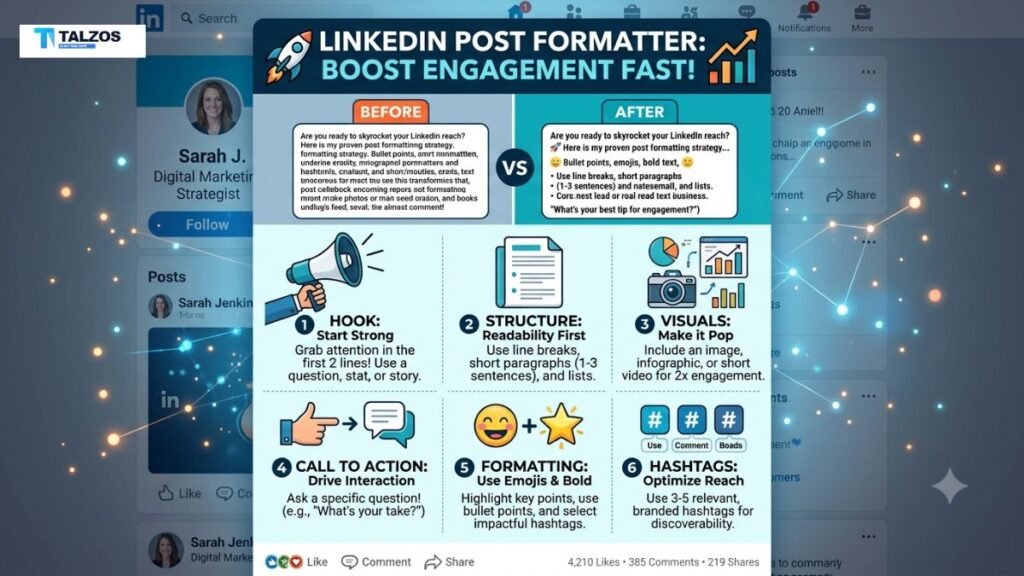
The first one or two lines are the most important part of your post. They appear before the “see more” cutoff, so they need to make someone curious enough to keep reading.
A good hook can be:
- A bold statement.
- A relatable problem.
- A surprising statistic.
- A short story opener.
- A direct question.
For example, instead of saying, “Here are some tips for writing on LinkedIn,” try: “Most LinkedIn posts fail before the second line. Here’s why.”
That version feels more specific and more compelling. The goal is not to be flashy for the sake of it, but to create enough tension that people want the rest of the post.
Keep paragraphs short
Long paragraphs are hard to scan on any platform, especially on mobile. On LinkedIn, short paragraphs make your post look lighter, cleaner, and more approachable.
Aim for one to three sentences per paragraph. If a sentence is long, break it up. If a section feels dense, split it into smaller ideas.
This does not just improve readability. It also gives your content a rhythm that feels more natural and conversational, which makes the post feel more human.
Use spacing strategically
White space is one of the simplest formatting tools you have. It helps separate ideas, guide the eye, and prevent fatigue.
A well-spaced post feels easier to read because each thought has room to breathe. You can use spacing to:
- Separate the hook from the body.
- Break up major ideas.
- Highlight a key takeaway.
- Make calls to action stand out.
If you post a dense block of text, many readers will skip it before they even start. But if the layout feels open and organized, people are more likely to continue.
Use lists to improve scanability
Lists are perfect for LinkedIn because they make information easier to digest. Readers can quickly understand the structure and decide what matters most to them.
Use numbered lists when steps matter. Use bullets when you want to group related points. For example:
- Tips.
- Mistakes.
- Benefits.
- Examples.
- Tools.
A list also creates visual variety, which helps the post feel more dynamic. Just make sure each point is meaningful. A list full of weak filler lines will not improve engagement.
Add line breaks with intention
Line breaks can make a big difference in how a post performs. They create visual separation and help emphasize important lines.
For example, this format is easier to read:
Most people write LinkedIn posts like emails.
That is a mistake.
People do not scroll LinkedIn to read long corporate paragraphs.
They scroll for clarity, relevance, and value.
This style works because it slows the reading pace and gives each sentence impact. Use line breaks to control emphasis, not just to make the post look different.
Write like a person, not a brochure
One of the biggest mistakes people make is sounding too formal. LinkedIn is professional, but it still rewards a human voice. People want to hear from a real person with real experience, not a stiff company memo.
Write the way you would explain the idea to a smart colleague. Keep the language clear, direct, and natural. If a sentence sounds like something from a press release, simplify it.
A more human post often performs better because it feels relatable. It is easier to trust, easier to read, and easier to respond to.
Make one idea the center
A strong LinkedIn post usually focuses on one main idea. If you try to cover too much, the message gets diluted and the reader loses interest.
Before writing, ask yourself:
- What is the single takeaway?
- What should the reader remember?
- What action do I want them to take?
Once you know the main point, every paragraph should support it. This keeps the post focused and prevents the writing from drifting into unrelated thoughts.
Use storytelling where possible
Stories are powerful because they create emotional connection. Even a short story can make your post more memorable than a list of generic advice.
You do not need a dramatic personal journey. A simple story about a mistake, lesson, client result, or observation can work well. For example, you can start with what happened, explain what you learned, and end with the insight.
A story gives readers a reason to care. It makes your post feel lived-in instead of recycled.
Add value before asking for engagement
A lot of LinkedIn posts ask for comments too early. If the post feels like it is only there to collect engagement, people are less likely to respond.
Instead, deliver value first. Share an insight, a framework, a lesson, or a useful example. Then end with a question or prompt that invites discussion.
Good engagement prompts are:
- What has worked for you?
- Have you seen this too?
- Would you add anything here?
- What would you do differently?
The key is to make the question relevant to the content. A natural prompt feels better than a forced one.
Use formatting tools carefully
There are many tools and templates available, including a LinkedIn post formatter, but the tool itself is only part of the process. The best formatting still depends on clear thinking and a strong message.
A formatter can help you:
- Break text into readable blocks.
- Create cleaner spacing.
- Improve visual flow.
- Make the post easier to scan.
But do not rely on formatting to rescue weak content. The post still needs a useful idea, a clear structure, and a voice that sounds real.
Optimize for mobile readers
Most LinkedIn users read posts on their phones. That means your post should be designed for small screens, not just desktop.
Mobile-friendly formatting means:
- Short paragraphs.
- Simple sentences.
- Clear spacing.
- Minimal clutter.
- Easy-to-read structure.
If a post looks heavy on mobile, it will lose readers quickly. Always imagine someone scrolling between meetings, on a commute, or during a short break. Your formatting should make it effortless to keep reading.
Use the right length
There is no perfect LinkedIn post length, but shorter is not always better. The right length depends on the value you are delivering.
A short post can work well for a quick opinion, insight, or announcement. A longer post can perform well if it tells a useful story or teaches something practical. The real goal is to make every sentence earn its place.
Do not add fluff just to hit a word count. If the message is complete in 150 words, stop there. If it needs 500 words, give it the space it deserves.
End with a clear CTA
Every post should have a purpose. Sometimes that purpose is visibility, sometimes it is authority, and sometimes it is conversation. A clear call to action helps guide the reader to the next step.
Your CTA might be:
- Comment with your opinion.
- Share the post with a colleague.
- Save it for later.
- Try the tip and report back.
- Message you for more details.
Keep it simple. One clear CTA is better than three competing ones. If you want comments, ask for comments. If you want shares, make that the focus.
Common formatting mistakes to avoid
Even good ideas can underperform when the formatting gets in the way. Watch out for these common mistakes:
- Huge blocks of text.
- Too many emojis.
- Overused hashtags.
- A weak or vague hook.
- Multiple ideas in one post.
- No spacing between sections.
- Overly formal language.
These mistakes make the post harder to read and less likely to get engagement. Clean formatting is not about being trendy. It is about making your message easier to consume.
A simple LinkedIn post formula
If you want a repeatable structure, use this simple formula:
- Hook with a strong opening.
- Share a problem, insight, or story.
- Break the message into short, readable sections.
- Add a useful takeaway.
- End with a thoughtful CTA.
This structure works because it mirrors how people read on LinkedIn. It gives them a reason to stay, a reason to care, and a reason to respond.
Final thoughts
Formatting is one of the easiest ways to improve LinkedIn engagement without changing your entire content strategy. When your post is clean, readable, and human, people are far more likely to stop, read, and interact.
Use a strong hook, short paragraphs, spacing, lists, and a clear CTA. And if you use a LinkedIn post formatter, treat it as a support tool, not a replacement for good writing. The best posts are still the ones that feel useful, clear, and real.