Every time you snap a photo and share it online, you might be giving away more than you think. Hidden inside that image is a layer of data called metadata—information about when, where, and how the photo was taken. If you don’t remove photo metadata before posting, you could unintentionally reveal your home address, daily routines, or even the exact model of your camera.
In this guide, we’ll walk you through what photo metadata is, why it matters for your privacy, and practical ways to strip it from your images before sharing. Whether you’re posting to social media, sending photos to clients, or uploading to a website, learning to remove photo metadata is a simple habit that can go a long way in protecting your personal information.
What Is Photo Metadata and Why Should You Care?
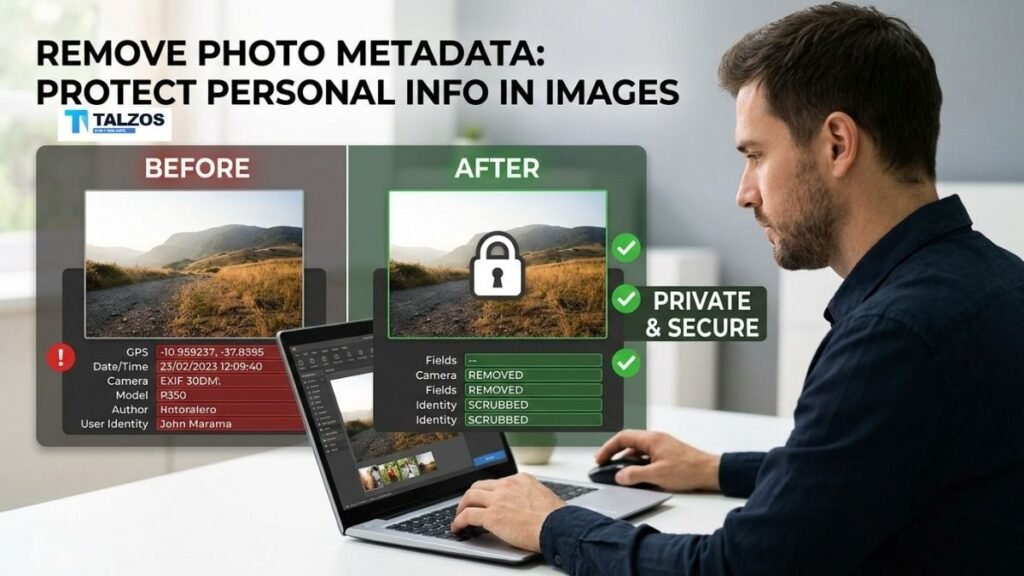
Photo metadata, often referred to as EXIF data (Exchangeable Image File Format), is information embedded in digital images by your camera or smartphone. It can include:
- Date and time the photo was taken
- Camera make and model
- Lens and exposure settings
- GPS coordinates showing where the photo was captured
- Software used for editing
- Sometimes even the photographer’s name or copyright info.
While this data is useful for photographers organizing their work, it becomes a privacy risk when shared publicly. For example, a vacation photo posted on Instagram could reveal your home neighborhood through GPS tags. A real estate listing might unintentionally expose the seller’s personal details. Even a simple selfie can disclose your device type and location history if metadata isn’t removed.
The good news? You don’t need to be a tech expert to fix this. Removing photo metadata is straightforward, and there are free tools for every device.
Risks of Sharing Images Without Removing Metadata
When you share images with metadata intact, you’re essentially attaching a digital ID card to your photo. Here’s what could happen:
- Location Tracking: GPS coordinates can pinpoint your home, workplace, or favorite hangouts. Stalkers or burglars could use this to learn your routines.
- Device Fingerprinting: Camera model and serial numbers can help identify your specific device, which may be used in targeted scams or phishing attempts.
- Editing History Exposure: If you edit photos, metadata might reveal the software you use and even your workflow—information that could be valuable to competitors or malicious actors.
- Accidental Personal Details: Some cameras embed the photographer’s name, copyright info, or even comments you added while organizing files.
These risks aren’t just theoretical. There have been documented cases where journalists, activists, and everyday users had their locations exposed through metadata in shared images.
How to Remove Photo Metadata on Different Devices
The process to remove photo metadata varies slightly depending on your device, but it’s always doable. Below are step-by-step instructions for the most common platforms.
Windows PCs
- Right-click the image file and select Properties.
- Go to the Details tab.
- Click Remove Properties and Personal Information at the bottom.
- Choose either:
- Create a copy with all possible properties removed, or
- Remove the following properties from this file (then select specific fields).
- Save the cleaned file and verify by checking the Details tab again.
This built-in method removes most standard EXIF fields, though some advanced tags might remain. For a thorough clean, consider a dedicated tool like ExifTool (more on that later).
macOS
Using Preview (built-in):
- Open the image in Preview (double-click the file).
- Click File > Export.
- Under Info, make sure Include Location Information is unchecked.
- Ensure the filename doesn’t contain personal details.
- Click Save and verify the result.
For complete removal:
- Use a free app like ImageOptim or the command-line tool ExifTool to strip all metadata, including color profiles and device tags.
iPhone (iOS)
Prevent future metadata:
- Go to Settings > Privacy > Location Services > Camera and set it to Never. This stops GPS data from being added to new photos.
Remove metadata from existing photos:
- Use the Share Sheet: Select a photo, tap Share, then Options, and toggle off Location. Note: this only removes GPS, not all EXIF data.
- For full removal, use a third-party app like Scrambled Exif (available via F-Droid for Android, but iOS users can try apps like ViewExif or Metadata Remover) or a browser-based tool.
Android
Prevent future metadata:
- In your camera app settings, turn off Location tags or Geotagging.
Remove metadata from existing photos:
- Use apps like NoMeta or Exif Remover PI, which let you strip all metadata with one tap. These apps preserve your original file and create a clean copy for sharing.
- Alternatively, use Scrambled Exif (available on F-Droid) for open-source, privacy-focused removal.
Online Tools (No Installation Needed)
If you prefer not to install apps, several free browser-based tools let you upload an image, view its metadata, and download a cleaned version:
- WildandFree EXIF Stripper: Supports batch processing, runs entirely in your browser.
- MiniWebTool EXIF Viewer/Remover: Works with JPG, PNG, WebP, HEIC, and TIFF files. All processing happens client-side, so your photos never leave your device.
- HighTool Image Metadata Remover: Drag and drop images to instantly delete EXIF, GPS, and other hidden data.
- Magic Eraser Live: Removes EXIF, IPTC, XMP, and GPS metadata in bulk.
These tools are great for quick jobs, but for sensitive images, consider offline software to avoid any risk of data leakage during upload.
Best Tools to Remove Photo Metadata in 2026
If you regularly share images and want a reliable, privacy-focused solution, here are the top tools tested and recommended for 2026:
- ExifTool: The gold standard for power users. It’s a command-line tool that removes every type of metadata (EXIF, IPTC, XMP, MakerNotes) from images and even other file types. Example command:
exiftool -all= -overwrite_original *.jpg
This strips all tags from every JPG in the folder. - Exif Cleaner: A user-friendly desktop app with batch support, ideal for non-technical users who want full control.
- ImageOptim (macOS): Optimizes images while removing metadata, perfect for web use.
- NoMeta (Android): One-tap removal for photos and videos, with original files preserved.
- Scrambled Exif (Android, F-Droid): Open-source, privacy-focused, and removes all EXIF fields.
- WildandFree EXIF Stripper (Browser): No installation, supports batch processing, and keeps everything client-side.
For most people, a combination of built-in OS tools (for quick jobs) and a dedicated app like ExifTool or NoMeta (for thorough cleaning) offers the best balance of convenience and security.
Best Practices for Sharing Images Safely
Removing metadata is just one part of protecting your privacy. Here are additional habits to adopt:
- Disable Geotagging by Default: Turn off location services for your camera app so new photos never include GPS data in the first place.
- Review Before Posting: Always check images for visible personal details (like street signs, house numbers, or license plates) before sharing.
- Use Private Sharing Methods: For sensitive photos, consider sending via encrypted messaging apps instead of public social media.
- Educate Friends and Family: If you’re in group photos, remind others to strip metadata too—your privacy can be compromised through their posts.
- Regular Audits: Periodically review your social media archives and remove or re-upload cleaned versions of old photos.
Common Myths About Photo Metadata
Let’s clear up a few misconceptions:
- “Social media platforms automatically remove metadata.”
While some platforms like Facebook and Instagram strip most EXIF data, others (like Twitter/X or certain forums) may not. Never assume your metadata is gone. - “Only professionals need to worry about metadata.”
Anyone who shares photos online is at risk. Everyday users are often the most vulnerable because they’re unaware of the data they’re exposing. - “Removing metadata ruins image quality.”
Stripping metadata doesn’t affect the visible image. The photo looks exactly the same—just without the hidden data.
Final Thoughts: Make Removing Photo Metadata a Habit
Protecting your personal information in shared images doesn’t require advanced tech skills. By taking a few extra seconds to remove photo metadata before posting, you can significantly reduce the risk of location tracking, device fingerprinting, and accidental data leaks.
Start small: pick one tool from the list above, practice on a few photos, and make it part of your sharing routine. Over time, it’ll become as natural as locking your door before leaving home.
Your digital footprint matters. Take control of it—one clean image at a time.