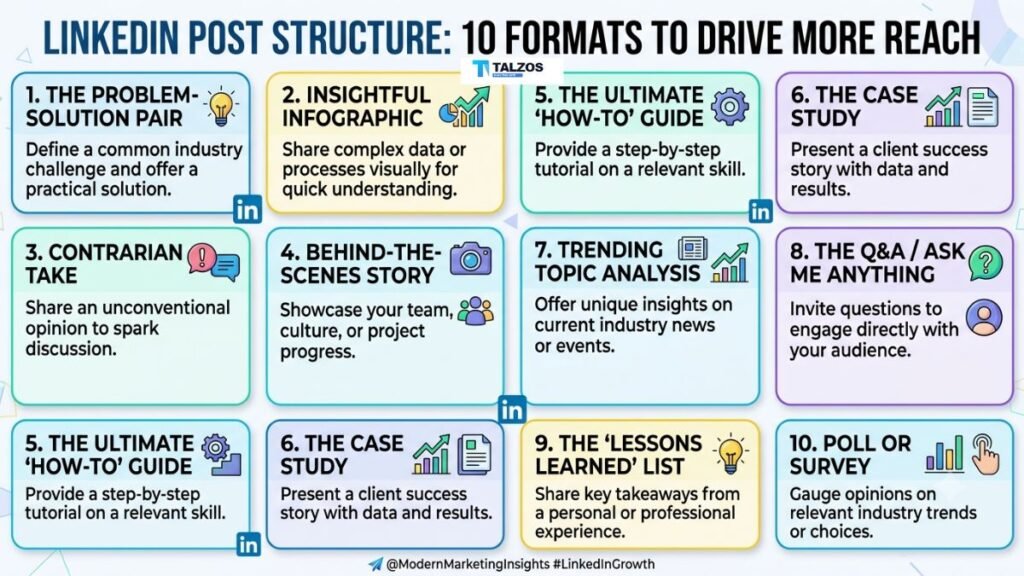
Creating a LinkedIn post is easy. Creating one that stops the scroll, holds attention, encourages conversation, and reaches people beyond your immediate network requires a clear strategy.
The right LinkedIn post structure gives your ideas direction. It helps readers understand your message quickly and makes your content easier to read on mobile devices. Whether you are building a personal brand, promoting a business, attracting clients, or sharing professional insights, the structure of your post can strongly influence its performance.
LinkedIn content research consistently shows that visual formats, including multi-image posts and native documents, can generate strong engagement compared with many text-only formats. However, the format alone is not enough. Your hook, message, storytelling, formatting, and call to action must work together.
Below are the best LinkedIn post structures to help you create useful, engaging, and shareable content.
Why LinkedIn Post Structure Matters
LinkedIn users scroll through content quickly. They may be checking their feed between meetings, commuting, or looking for a quick professional insight. If your post begins with a long introduction or unclear message, readers may move on before reaching your main point.
A strong LinkedIn post structure improves your content in several ways:
- It captures attention quickly.
- It makes complex ideas easier to understand.
- It encourages readers to continue until the final line.
- It creates natural opportunities for comments and shares.
- It helps you communicate one clear idea instead of several disconnected thoughts.
A well-structured post also makes content creation easier. Instead of staring at a blank screen, you can follow a repeatable framework and focus your energy on the insight, story, or lesson you want to share.
1. The Hook, Value, and Question Structure
This is one of the simplest and most effective LinkedIn post structures. It works well for educational content, professional opinions, and practical advice.
The framework is:
- Start with a strong hook.
- Deliver useful information.
- End with a relevant question.
Your hook should create curiosity without misleading the reader. For example:
Most professionals do not have a writing problem.
They have a clarity problem.
You can then explain why unclear writing reduces engagement and provide three practical ways to make professional posts easier to understand. Finish with a question such as:
What is the biggest challenge you face when writing on LinkedIn?
This structure works because it combines attention, value, and conversation. The question should relate directly to the topic rather than asking for generic engagement.
2. The Personal Story Structure
Personal stories perform well because they make professional lessons more relatable. The key is to connect the story to a useful takeaway instead of simply describing what happened.
Use this structure:
- Describe the situation.
- Explain the challenge.
- Share what you did.
- Reveal the result.
- End with the lesson.
For example, you might write about losing a client presentation, making a hiring mistake, or struggling to publish consistently. Be specific about the moment of tension. Details help readers see themselves in the situation.
A strong personal story might begin:
Six months ago, I stopped posting on LinkedIn because I believed every post needed to be perfect.
Then explain what changed, what you learned, and how the experience affected your approach. The final lesson could be:
Consistency did not come from becoming a better writer. It came from lowering the pressure to sound impressive.
This LinkedIn post structure is especially useful for founders, consultants, career professionals, and creators who want to build trust.
3. The Problem, Mistake, and Solution Structure
This format is ideal for practical business content. It shows readers that you understand a problem and can offer a clear way forward.
Begin by identifying a familiar challenge:
Your LinkedIn posts may be getting views but no meaningful conversations.
Next, explain a common mistake:
The problem is often not your topic. It is that your post focuses on what you want to say instead of what your audience needs to understand.
Then provide a solution. Break it into simple steps, such as choosing one audience, addressing one problem, and ending with a specific discussion prompt.
This structure feels useful because it moves logically from frustration to resolution. It can be used for marketing advice, leadership lessons, sales strategies, workplace communication, and career development.
4. The List-Based LinkedIn Post Structure
List posts are easy to scan and work well when readers want quick, practical information. Examples include:
- Seven questions to ask before accepting a job.
- Five ways to improve your sales follow-up.
- Ten lessons from building a remote team.
- Four signs your content strategy needs attention.
For better reach, avoid creating a list simply to increase the number of points. Each item should provide a distinct and useful idea. Add a short explanation or example instead of writing one-word tips.
A useful list post might follow this format:
Five ways to make your LinkedIn posts easier to read:
- Use short paragraphs.
- Remove unnecessary introductions.
- Focus on one idea.
- Add specific examples.
- End with a clear takeaway.
You can make the post more memorable by placing your strongest point first or last. Use white space so the list does not appear as one large block of text.
5. The Contrarian Opinion Structure
A contrarian post challenges a popular assumption. It can attract attention because it gives readers a new way to view a familiar issue.
Use this structure:
- State the common belief.
- Challenge it.
- Explain your alternative view.
- Support it with an example.
- Invite thoughtful responses.
For example:
More LinkedIn posts do not automatically create more authority.
You could explain that publishing daily is less valuable than consistently sharing useful ideas with a specific audience. Add an example from your own experience or a broader observation from your industry.
The goal is not to create controversy for its own sake. A contrarian post should be respectful, well-reasoned, and useful. Avoid exaggerated claims, personal attacks, or opinions designed only to generate arguments.
6. The Before-and-After Structure
Before-and-after posts are effective because they show transformation. They work particularly well for case studies, career stories, business results, and process improvements.
The structure is:
- Describe the situation before.
- Explain the change.
- Show the situation after.
- Identify the actions that created the result.
For instance, a marketing consultant could write about a company that moved from posting random promotional updates to using educational content. A job seeker could explain how changing their positioning led to better interviews.
Whenever possible, include measurable details. Instead of saying “engagement improved,” explain that meaningful comments increased, profile visits grew, or qualified inquiries became more frequent.
Do not present the result as effortless. Readers are more likely to trust a transformation story when you explain the obstacles, decisions, and work behind it.
7. The Step-by-Step Tutorial Structure
Tutorial posts provide immediate value because they teach readers how to complete a task. They are excellent for software tips, marketing processes, workplace systems, and professional skills.
A clear tutorial structure includes:
- The desired outcome.
- The tools or preparation required.
- The steps to follow.
- Common mistakes to avoid.
- The expected result.
For example, a post about writing a LinkedIn update could begin:
Here is a simple process for turning one client question into a week of content.
Then explain how to identify the question, extract the main lesson, create different examples, and adapt the idea into a text post, carousel, and short video.
Use numbered steps when the order matters. Keep each step concise and use concrete language. Readers should be able to save the post and return to it later without needing additional explanation.
8. The LinkedIn Carousel Structure
Document posts and carousels are useful when your subject needs more explanation than a short text update can provide. Research from Socialinsider found that multi-image posts and native documents were among the strongest-performing formats in its analysis of LinkedIn company pages.
A strong carousel structure looks like this:
- Slide one: A clear promise or strong headline.
- Slide two: The problem or context.
- Slides three to seven: The key lessons or steps.
- Second-to-last slide: A summary or practical checklist.
- Final slide: A focused call to action.
Avoid filling every slide with long paragraphs. Use one main idea per slide, readable typography, and consistent visual design. The text that accompanies the carousel should provide context, not repeat every word shown in the document.
A carousel can also be created from an existing blog post, presentation, customer question, or internal training document. Repurposing useful material makes your content process more efficient.
9. The Data, Insight, and Implication Structure
Data can make a LinkedIn post more credible, but numbers alone rarely create meaningful engagement. Readers need to understand what the data means and why it matters.
Use this framework:
- Present a relevant statistic.
- Explain the insight behind it.
- Connect it to your audience.
- Recommend an action.
For example:
Many companies invest in publishing more content but spend less time understanding what their audience actually needs.
You can then explain that content volume cannot compensate for weak positioning. The implication might be that businesses should study customer questions, sales objections, and support conversations before planning their content calendar.
Always identify the source of important statistics. Avoid using impressive numbers without context, because unsupported claims can reduce trust.
10. The Short Opinion and Takeaway Structure
Not every LinkedIn post needs to be long. A concise opinion can perform well when it is specific and supported by a clear reason.
Use this simple structure:
- Make one direct statement.
- Give one or two reasons.
- End with a memorable takeaway.
For example:
A professional network is not built by collecting connections.
It is built by being useful before you need anything.
Then explain how sharing thoughtful comments, making introductions, and offering practical help can create stronger relationships than sending large numbers of connection requests.
Short posts are most effective when every sentence has a purpose. Remove filler, broad claims, and unnecessary background. A focused 80-word post can be more powerful than a 500-word post with no clear point.
How to Improve Any LinkedIn Post Structure
Regardless of the framework you choose, apply these principles before publishing.
Write a Clear Hook
The first two or three lines should tell readers why the post deserves their attention. Use a surprising observation, a specific problem, a strong lesson, or a clear promise.
Avoid vague openings such as “I want to share some thoughts.” Replace them with direct language that creates immediate context.
Keep One Main Idea
A post about leadership, content strategy, hiring, productivity, and personal branding may contain useful information, but combining everything weakens the message. Choose one central idea and save related points for future posts.
Format for Mobile Reading
Use short paragraphs, line breaks, and occasional bullets. Large blocks of text are difficult to scan, especially on a phone. LinkedIn’s creator guidance also emphasizes relevance, authentic engagement, consistency, and depth over simply publishing more frequently.
Add a Natural Call to Action
Your call to action should match the purpose of the post. Ask readers to share an experience, choose between two options, explain their approach, or add a missing tip.
Avoid ending every post with “Agree?” A more specific question creates better conversations.
Respond to Comments
Publishing is only the beginning. Reply to comments with additional examples, thoughtful questions, or useful clarification. Meaningful interaction can extend the life of a post and help turn a one-way update into a professional discussion.
Final Thoughts
The best LinkedIn post structure is the one that makes your message clear, useful, and easy to engage with. Personal stories build connection, tutorials provide practical value, carousels simplify complex ideas, and opinion posts help you develop a recognizable point of view.
Start with one structure that fits your communication style. Test different hooks, formats, and calls to action, then review which posts generate meaningful comments, saves, shares, profile visits, and business conversations. Reach is not only about attracting more views; it is about reaching the right people with a message they remember.