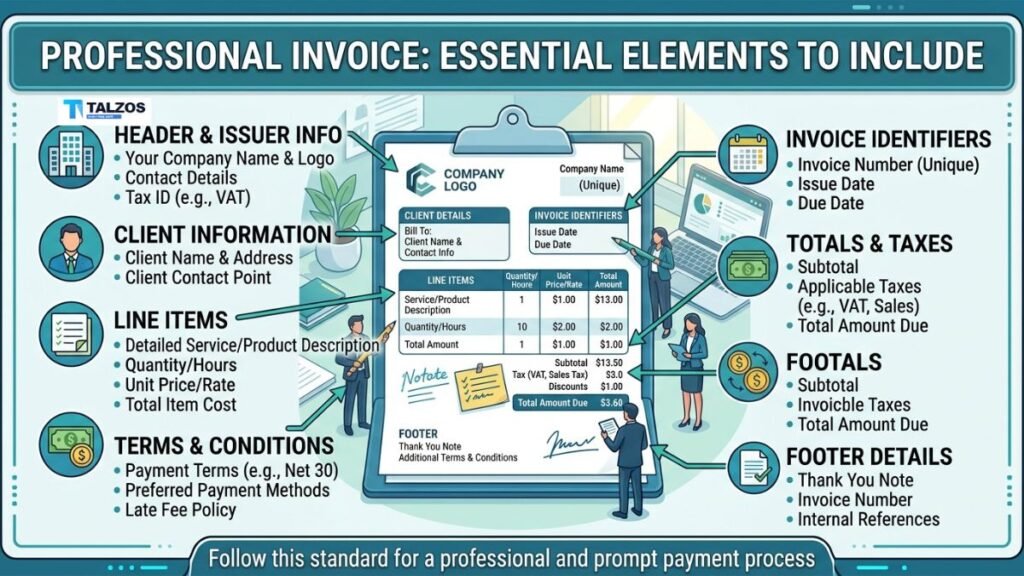
An invoice is more than a request for payment. It is a professional record of a transaction, a communication tool between businesses, and an important document for bookkeeping and tax reporting. When an invoice is clear and complete, clients can quickly understand what they are paying for, when payment is due, and how to submit it.
A well-prepared professional invoice can also make your business appear more organized and trustworthy. On the other hand, missing information, confusing charges, or vague payment instructions can delay payments and create unnecessary back-and-forth.
Whether you work as a freelancer, run a small business, or manage billing for a larger company, every invoice should contain several essential elements. This guide explains what to include, why each item matters, and how to create invoices that are easy to read, accurate, and effective.
1. Your Business Information
Every invoice should begin with your business details. This tells the customer who issued the invoice and gives them a reliable way to contact you.
Include:
- Business name.
- Logo, if applicable.
- Business address.
- Phone number.
- Professional email address.
- Website.
- Tax identification number, when required.
- Business registration details, if relevant.
If you operate under a registered company name but use a different trading name, consider listing both. For example, you might write “Brightline Design, operated by Brightline Creative LLC.”
Your contact information should be easy to find, usually near the top of the page. Avoid using a personal email address that looks informal or may be difficult to recognize. A branded business email can help reinforce credibility.
If your business is not registered for sales tax or value-added tax, do not add tax charges simply because they appear on an invoice template. Only include tax information that applies to your business and location.
2. The Client’s Details
A professional invoice should clearly identify the customer or company being billed. This prevents confusion, especially when a client has multiple departments, offices, or billing contacts.
Include:
- Client or company name.
- Billing address.
- Contact person.
- Email address.
- Phone number, if useful.
- Purchase order number, when provided.
- Tax or business identification number, if required.
For business clients, ask whether the invoice should be addressed to a specific department, such as accounts payable or procurement. Sending the invoice to the wrong person can slow down approval and payment.
Make sure the client’s legal business name is spelled correctly. An incorrect name can cause problems with internal accounting systems and may require you to reissue the invoice.
3. A Unique Invoice Number
Each invoice should have its own identification number. This number helps you and your client track the transaction from creation through payment.
Invoice numbers can be:
- Sequential, such as INV-1001, INV-1002, and INV-1003.
- Based on the year, such as 2026-001.
- Linked to a project, such as WEB-042.
- Organized by client, such as ACME-015.
Choose a system that is consistent and easy to manage. Avoid using invoice numbers that are overly complicated or impossible to search.
A unique number is particularly useful when a client asks about a payment, when you need to issue a credit note, or when your accountant reviews your records. It also reduces the risk of duplicate invoices.
4. The Invoice Date
The invoice date shows when the document was issued. It is one of the simplest details to include, yet it plays an important role in payment tracking and financial records.
The invoice date may affect:
- The payment deadline.
- The accounting period in which revenue is recorded.
- Tax reporting.
- Late-payment calculations.
- Contractual obligations.
Use a date format that cannot be misunderstood. For international clients, writing “August 26, 2026” is often clearer than using a numerical format such as 08/26/26 or 26/08/26.
If you send a revised invoice, make sure the new version is clearly marked and that the client knows which invoice should be used for payment.
5. A Clear Description of Products or Services
The central part of any invoice is the description of what was sold. Clients should not have to guess what a charge represents.
Each line item should explain:
- The product or service provided.
- The date or period of service.
- The quantity.
- The rate or unit price.
- Any applicable discount.
- The line-item total.
For example, instead of writing “Consulting — 1 — $1,500,” you could write:
Marketing strategy consultation, including customer research, campaign recommendations, and a 60-minute review meeting — 1 project — $1,500.
The second description gives the client a much clearer understanding of what the charge includes. It can also reduce disputes by connecting the invoice to the original agreement or project scope.
For hourly work, include the number of hours and the hourly rate. For products, include item names, quantities, product codes, or sizes where appropriate.
6. Subtotal, Taxes, Discounts, and Total
A complete invoice should show exactly how the final amount was calculated. This makes the document easier to review and helps prevent billing questions.
The financial summary commonly includes:
- Subtotal before discounts and taxes.
- Discounts or credits.
- Shipping, handling, or other fees.
- Applicable taxes.
- Final amount due.
- Currency.
For example:
| Description | Amount |
|---|---|
| Subtotal | $2,000.00 |
| Early-payment discount | -$100.00 |
| Sales tax | $152.00 |
| Total due | $2,052.00 |
The numbers should add up correctly. A small mathematical error can undermine confidence in the entire invoice and may force you to send a correction.
Always state the currency when there is any possibility of confusion. A symbol such as “$” may refer to several currencies, so writing “USD,” “CAD,” “AUD,” or another currency code is safer for international transactions.
7. Payment Terms and Due Date
Payment terms explain when and how the client should pay. A due date should be visible rather than buried in a paragraph.
Common payment terms include:
- Due upon receipt.
- Net 7.
- Net 15.
- Net 30.
- Net 60.
- Payment due by a specific calendar date.
“Net 30” generally means payment is due 30 days after the invoice date, but it is still wise to include the exact due date. This removes uncertainty and helps both parties manage cash flow.
You can also explain early-payment incentives or late-payment consequences. For example:
A 2% discount applies when payment is received within 10 days. A late fee of 1.5% per month may apply to overdue balances.
Only include fees or discounts that were agreed upon in advance or are permitted by your contract and applicable law. Surprise charges can damage the relationship with a client and may be difficult to enforce.
8. Payment Methods and Instructions
Even when an invoice is accurate, payment may be delayed if the client does not know how to pay. Provide simple, complete instructions.
Depending on your business, you might accept:
- Bank transfer.
- Credit or debit card.
- Online payment link.
- Digital wallet.
- Check.
- Automated clearing house payment.
- International wire transfer.
For bank payments, provide the correct account name, bank name, account number, routing details, and any information required for international transfers. Be careful with sensitive financial information and use secure systems where possible.
If you include an online payment link, make sure it works before sending the invoice. The link should take the client directly to the payment page rather than to a general homepage.
You can also state whether the customer is responsible for transaction fees, currency conversion fees, or bank charges. This should be communicated before the payment is made.
9. Purchase Order or Contract References
Some clients require invoices to include a purchase order number, contract number, project code, or other internal reference. Without it, the invoice may be rejected or delayed by the accounts payable department.
Ask your client about their billing requirements before beginning work. Their process may require:
- A purchase order number.
- A specific invoice email address.
- A project manager’s approval.
- A vendor identification number.
- A particular file format.
- Supporting timesheets or receipts.
Including the relevant reference connects your invoice to the client’s internal system. It also helps demonstrate that the charge relates to an approved purchase or project.
10. Tax and Legal Information
Tax requirements vary by country, state, province, industry, and business structure. Some businesses must display tax registration numbers, tax rates, or specific wording on their invoices.
Depending on your situation, you may need to include:
- Sales tax, VAT, or goods and services tax.
- Your tax registration number.
- The client’s tax identification number.
- A tax-exemption note.
- Reverse-charge wording.
- Place of supply.
- Required legal disclosures.
Do not copy tax language from another company without checking whether it applies to you. If you sell across borders or provide regulated services, professional accounting advice may be worthwhile.
Even when tax is not charged, an explanation can help. A short note such as “No sales tax charged; seller is not registered for sales tax” may answer a question before the client needs to ask it. Use wording appropriate to your jurisdiction and circumstances.
11. Notes, Terms, and Supporting Documents
A notes section can provide helpful context without cluttering the main invoice. You might use it for:
- A thank-you message.
- Project completion details.
- Service dates.
- Delivery information.
- References to attached timesheets.
- Instructions for disputing a charge.
- Warranty information.
- Reminders about recurring services.
Keep notes concise and relevant. An invoice is not the place for a long sales pitch or unrelated business information.
If the invoice depends on supporting documents, attach them or provide a secure link. Examples include delivery receipts, expense records, timesheets, milestone approvals, and signed work orders.
12. A Professional and Readable Design
Good invoice design supports accuracy and fast payment. It should look polished without becoming difficult to scan.
A readable layout generally includes:
- A clear “Invoice” label.
- Consistent fonts.
- Adequate white space.
- Aligned columns.
- A prominent total amount.
- Logical grouping of business, client, and payment details.
- Consistent branding.
Avoid excessive colors, decorative fonts, crowded tables, and unnecessary graphics. The client should be able to find the invoice number, due date, total, and payment instructions within seconds.
Save invoices as PDF files unless the client requests another format. A PDF helps preserve the layout and reduces the possibility that the document will be accidentally edited.
Before sending, open the final file and check it on both a computer and a mobile device. Make sure text is readable, links work, and no placeholder information remains.
13. A Simple Invoice Review Checklist
Before sending an invoice, review the following checklist:
- Your business name and contact information are correct.
- The client’s legal name and billing details are accurate.
- The invoice has a unique number.
- The invoice date is included.
- Products or services are described clearly.
- Quantities, rates, and line totals are correct.
- Discounts and additional fees are shown.
- Taxes are calculated correctly.
- The currency is stated.
- The final amount due is easy to find.
- The payment due date is clear.
- Payment instructions are complete.
- Purchase order or contract references are included.
- Required legal or tax information appears.
- Supporting documents are attached when necessary.
- The invoice has been proofread and saved in a professional format.
This quick review can prevent avoidable delays and reduce the need to issue corrected invoices.
Conclusion
Creating a professional invoice does not have to be complicated. The key is to include enough information for the client to understand the transaction, approve the charge, and complete payment without additional questions.
At a minimum, include your business details, the client’s information, a unique invoice number, the invoice date, an itemized description of products or services, the subtotal, taxes, total amount, payment terms, due date, and payment instructions. Add purchase order references, legal details, notes, and supporting documents when they apply.
A clear invoice reflects the quality of your business. By using a consistent format and reviewing each document before sending it, you can look more professional, reduce payment friction, and maintain cleaner financial records.