Starting your freelance career is exciting. You get to choose your projects, work with different clients, and build a business around your skills. However, freelancing also comes with responsibilities that are easy to overlook—especially invoicing.
A clear and professional freelancer invoice helps you request payment, track your income, and maintain a healthy relationship with clients. It also makes your business look more organized and trustworthy.
If you have never created an invoice before, do not worry. This beginner-friendly guide explains what an invoice is, what information to include, how to send one, and how to avoid common payment problems.
What Is a Freelancer Invoice?
A freelancer invoice is a document that tells your client how much they owe you for the services you provided. It usually includes a description of your work, the total amount due, payment instructions, and a deadline.
An invoice is different from a quote or proposal. A quote explains how much a project may cost before the work begins. An invoice is sent after you complete the work or reach an agreed payment milestone.
For example, if you design a website for a client, your invoice may include:
- Website design and development.
- Number of hours or project-based fee.
- Additional costs, such as stock images or software.
- Taxes, if applicable.
- The final amount due.
- The payment due date.
A professional invoice creates a written record of the transaction. It can also help you organize your finances and prove your income when applying for a loan, renting a home, or filing taxes.
Why Invoicing Matters for Freelancers
Many beginners see invoicing as an administrative task, but it directly affects your cash flow. You can complete excellent work, but you cannot run a sustainable freelance business if clients do not pay on time.
A well-prepared invoice helps you:
- Get paid for your work.
- Explain exactly what the client is paying for.
- Set clear payment expectations.
- Reduce confusion about project costs.
- Track outstanding payments.
- Maintain accurate business records.
- Look more professional and reliable.
Invoicing also encourages you to treat freelancing as a real business rather than an occasional side activity. Even if you only have one client, creating consistent invoices helps you develop good habits from the beginning.
When Should You Send an Invoice?
The right time to send an invoice depends on your agreement with the client. Always discuss your payment schedule before starting a project. Do not wait until the work is finished to mention payment terms.
Common invoicing schedules include:
- Upfront payment: You request the full amount before beginning the project.
- Deposit and final payment: The client pays part of the fee before work starts and the remainder after completion.
- Milestone billing: You send invoices after reaching specific project stages.
- Monthly billing: You invoice the client at the end of each month.
- Payment after completion: You send the invoice when the entire project is finished.
For larger projects, milestone billing is often safer than waiting until the end. It allows you to receive payment as you deliver value and reduces the financial risk of spending weeks on unpaid work.
Your contract should explain when invoices will be sent and how long the client has to pay. Common payment periods include “due upon receipt,” seven days, fourteen days, or thirty days.
Essential Elements of a Freelancer Invoice
A freelancer invoice does not need to be complicated. It should be easy to read and contain all the information your client needs to process payment.
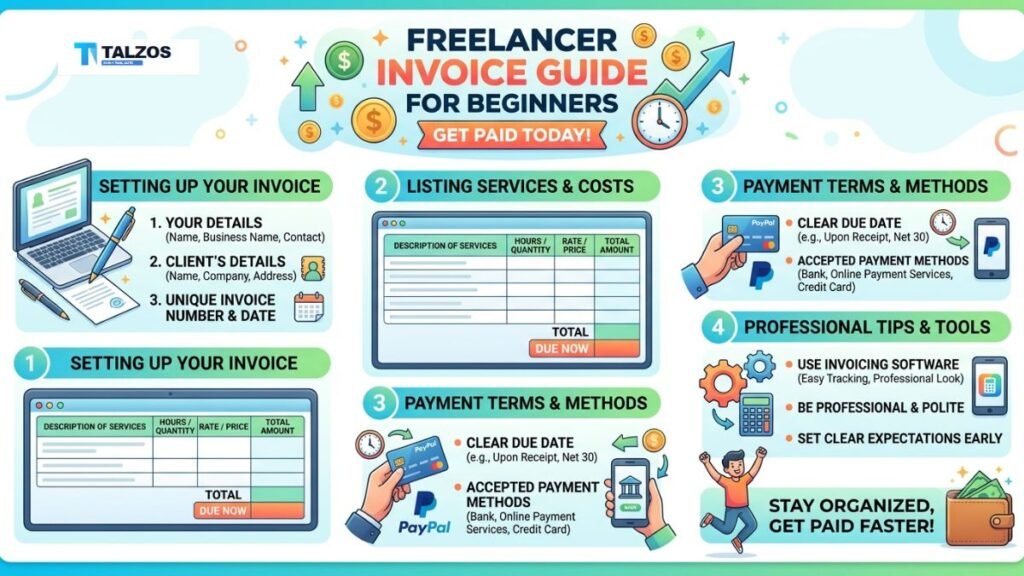
1. Your Business Information
Start with your professional details. Include your full name or business name, address, email address, phone number, and website if you have one.
If you operate under a registered business, add the relevant registration or tax identification number. This may be required by local laws or by business clients.
2. Client Information
Add the client’s name, company name, billing address, email address, and contact person. Confirm these details before sending the invoice, especially if the client has a finance department.
Sending an invoice to the wrong person can delay payment. Ask whether invoices should go to the project manager, accounts department, or a specific billing email.
3. Invoice Number
Every invoice should have a unique invoice number. You can use a simple sequence, such as INV-001, INV-002, and INV-003.
Invoice numbers make it easier to locate records, discuss payments, and identify unpaid invoices. Avoid changing an invoice number after sending it unless you issue a corrected version.
4. Invoice and Due Dates
Include the date you created the invoice and the date payment is due. If your terms are “due within fourteen days,” calculate the exact due date and display it clearly.
A specific date is better than vague wording. “Payment due by September 15” is more useful than “payment due in two weeks.”
5. Description of Services
Describe the work in plain language. The client should understand what each charge represents without needing to contact you for an explanation.
Instead of writing “Consulting,” use a more specific description such as “Two-hour marketing strategy consultation and written action plan.”
For hourly work, include your hourly rate, number of hours, and subtotal. For fixed-price projects, explain the deliverable and agreed project fee.
6. Total Amount
Show the subtotal, taxes, discounts, additional charges, and final amount due. Make sure the total is mathematically correct.
If you charge in a foreign currency, clearly state the currency. For example, write USD 750 or EUR 500 instead of using a symbol that could be misunderstood.
7. Payment Instructions
Tell the client exactly how to pay you. Depending on your location and preferences, you may accept bank transfers, online payment platforms, cards, digital wallets, or other methods.
Include the necessary account information, payment link, or instructions. If a payment platform charges a transaction fee, explain in your contract who is responsible for that cost.
8. Notes and Terms
Use the notes section for helpful information, such as a thank-you message, late payment policy, revision terms, or project reference number.
Keep this section professional and concise. Your invoice should not replace a contract, so avoid adding major conditions that were never discussed.
How to Create Your First Freelancer Invoice
Creating your first invoice is easier when you follow a simple process.
Step 1: Confirm the Agreement
Review your proposal or contract before preparing the invoice. Check the project fee, payment schedule, taxes, currency, and agreed expenses.
This step helps you avoid charging an amount that does not match the original agreement.
Step 2: Choose an Invoice Format
You can create an invoice using a word processor, spreadsheet, accounting software, or online invoicing platform. A simple template is enough when you are starting.
Choose a format that looks professional and allows you to save copies. PDF is usually a good option because the layout is less likely to change when the client opens it.
Step 3: Add All Required Details
Enter your information, the client’s information, invoice number, dates, services, totals, and payment instructions.
Use clear headings and enough spacing. Avoid decorative fonts, distracting colors, or overly complex designs that make important details difficult to find.
Step 4: Review the Invoice
Check the spelling of the client’s name, the invoice number, calculations, currency, bank details, and due date.
Read the invoice as if you were the client. Could someone unfamiliar with the project understand what they are being charged for?
Step 5: Export and Send It
Save the invoice as a PDF and use a clear file name, such as “INV-024-Website-Design.pdf.” Send it from a professional email address with a short, polite message.
Your email could say:
“Hi Maria,
Thank you for working with me on the website project. Please find invoice INV-024 attached. The total amount due is USD 800, with payment requested by September 15. Please let me know if you have any questions.
Best,
Your Name”
Common Invoicing Mistakes to Avoid
Even a small mistake can delay payment or create an uncomfortable conversation. Watch out for these common problems:
- Sending an invoice without confirming the client’s billing details.
- Forgetting to include a due date.
- Using unclear service descriptions.
- Mixing personal and business expenses.
- Sending invoices without unique numbers.
- Charging more than the agreed amount.
- Forgetting taxes or approved project expenses.
- Failing to keep a copy of every invoice.
- Using different payment terms for the same client without explanation.
- Waiting too long to follow up on overdue payments.
One of the biggest mistakes is treating invoicing as optional. Send invoices promptly after completing work or reaching a milestone. The longer you wait, the easier it is for the client to forget the details of the project.
How to Follow Up on an Unpaid Invoice
Following up does not have to feel confrontational. A polite reminder is often all that is needed because the client may have missed the email or forgotten to forward it to the finance team.
Send your first reminder shortly after the due date:
“Hi Daniel,
I hope you are well. I wanted to follow up on invoice INV-018, which was due on September 10. Please let me know if the invoice has been received or if you need any additional information to process the payment.
Best,
Your Name”
If you do not receive a response, send a firmer follow-up after a few business days. Restate the invoice number, amount, due date, and payment instructions.
For future projects, consider requesting a deposit, using milestone payments, or adding a late payment clause to your contract. These steps are easier to introduce before a payment problem occurs.
Tools for Managing Freelancer Invoices
As your freelance business grows, managing invoices manually can become time-consuming. Different tools can help you create invoices, send reminders, track payments, and organize financial records.
You may use:
- Spreadsheet templates for a simple, low-cost system.
- Accounting software for income and expense tracking.
- Online invoicing platforms for automated reminders.
- Payment processors for invoices with built-in payment links.
- Project management tools that connect work records with billing.
Choose a tool based on your needs, budget, location, and preferred payment methods. The best option is not always the most advanced one. A simple system that you use consistently is more valuable than an expensive platform that feels confusing.
Best Practices for Professional Invoicing
Make invoicing part of your regular workflow. Set aside a specific time each week to prepare invoices, check payment status, and update your records.
Use a consistent visual style across your proposals, contracts, invoices, and emails. This creates a recognizable professional identity and helps clients trust your business.
Keep invoices short and readable. Include enough detail to explain the charges, but avoid filling the page with unnecessary information.
Finally, protect your records. Save invoices, contracts, receipts, and payment confirmations in organized folders. Use cloud storage or another secure backup system so you do not lose important financial information.
Final Freelancer Invoice Checklist
Before sending a freelancer invoice, confirm that it includes:
- Your name or business name.
- Your contact and payment details.
- The client’s correct billing information.
- A unique invoice number.
- The invoice date.
- The payment due date.
- A clear description of services.
- Rates, quantities, and subtotals.
- Taxes, discounts, and additional expenses.
- The final amount due.
- Payment instructions.
- Any relevant notes or terms.
A professional invoice is more than a request for money. It is a record of your work, a reflection of your business, and an important part of your relationship with clients. Start with a simple template, agree on payment terms early, and send every invoice promptly. With these habits, invoicing becomes less stressful and getting paid becomes much more predictable.