If you want your resume to get seen by a recruiter, it has to survive the first filter: the applicant tracking system. ATS-friendly resume formatting helps your document stay readable, searchable, and easy to rank for the job you want.
A well-formatted resume does more than look clean. It helps your skills, experience, and keywords pass through software that screens candidates before a human even opens the file.
What ATS-Friendly Means
An ATS-friendly resume is built so software can read it correctly and extract the right information. That usually means using a simple layout, standard headings, common fonts, and text that is not hidden inside images, tables, or decorative elements.
In practice, the goal is simple: make it easy for both the system and the recruiter to understand your background fast. If the ATS cannot parse your resume well, even a strong candidate may get overlooked.
Why Formatting Matters
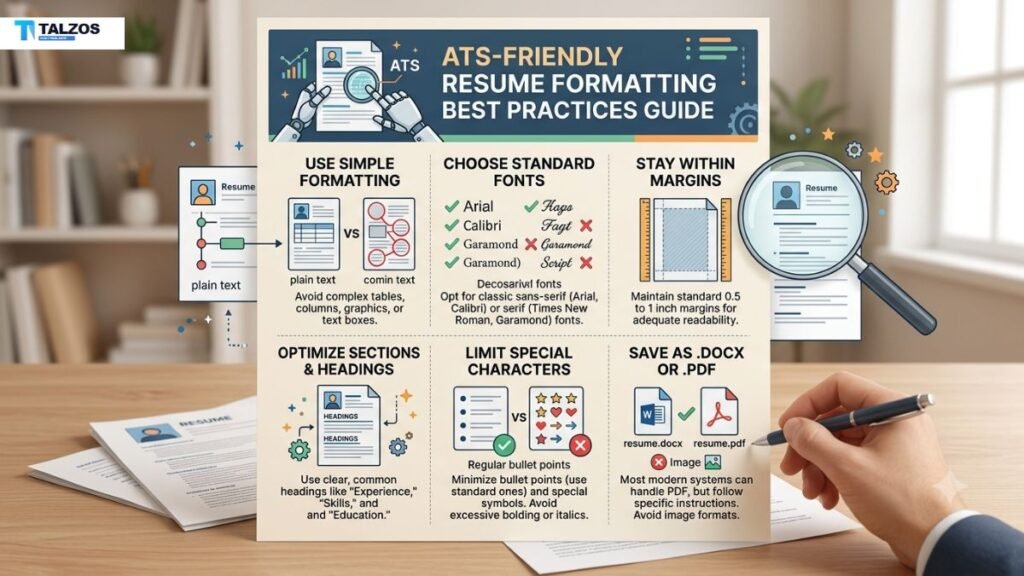
Formatting affects whether your resume is read in the right order and whether important details are captured. ATS tools can struggle with multi-column layouts, text boxes, graphics, icons, and unusual section labels.
That means design choices can hurt you even if your experience is excellent. Clean structure is not about being boring; it is about making your qualifications visible to the software that screens applications first.
Best Layout Choices
The safest option is a single-column resume with left-aligned text and a clear top-to-bottom flow. This keeps the information easy to scan and reduces the risk of the ATS scrambling the order of your sections.
Use standard section headers such as Work Experience, Education, and Skills. Avoid creative labels like “My Story” or “What I’ve Done,” because the system may not recognize them properly.
Fonts and Spacing
Use common fonts such as Arial, Calibri, Georgia, Helvetica, or Times New Roman. These fonts are widely supported and easier for ATS software to read without formatting issues.
Keep body text between 10 and 12 points and section headings around 14 to 16 points. Standard margins, simple line spacing, and consistent spacing between sections also help the resume stay clean and readable.
File Type and Structure
Unless a job post says otherwise, submit your resume as a .docx file or a text-based PDF. Scanned PDFs and image-based files can cause ATS systems to miss important text entirely.
Make sure your contact information is in the body of the document, not hidden in a header or footer. Some ATS platforms ignore those areas, which can cause your email or phone number to be lost.
Keywords in Context
Keywords matter, but they should appear naturally in your resume content. Pull terms from the job description and place them in your summary, skills, and work experience sections where they make sense.
Do not stuff a keyword list into your resume just to check a box. ATS systems and recruiters both respond better when skills are supported by real examples, achievements, and measurable results.
Sections to Include
A strong ATS-friendly resume usually includes these core sections:
- Contact information.
- Professional summary or objective.
- Work experience.
- Education.
- Skills.
- Optional sections like certifications, projects, or volunteer experience.
Keep the order logical and consistent. Reverse chronological work history is usually the easiest format for ATS systems and hiring teams to follow.
Formatting Mistakes to Avoid
Many resumes fail because of design choices that look attractive to people but confuse software. Common problem areas include columns, tables, text boxes, logos, icons, decorative bullets, colored text, and unusual symbols.
Here are a few mistakes to skip:
- Using a multi-column layout.
- Putting key details in a header or footer.
- Adding graphics or photos.
- Using fancy fonts or excessive color.
- Creating section names that are too creative.
- Saving only as an image file or scanned PDF.
Humanizing Your Resume
ATS-friendly does not mean robotic. Your resume should still sound like a real person with real impact, not a keyword sheet.
Use action verbs, concrete achievements, and simple language that shows how you work. For example, instead of writing “Responsible for project coordination,” you could write “Coordinated five client projects and improved on-time delivery by 20%.” That feels more human and gives the ATS useful context at the same time.
A Simple Checklist
Before you send your resume, do a quick final check:
- Use a single-column layout.
- Keep standard section headings.
- Choose a common font.
- Use a .docx or text-based PDF.
- Place contact details in the main body.
- Add keywords naturally from the job description.
- Remove tables, graphics, icons, and text boxes.
- Proofread for spelling and formatting issues.
A short checklist like this can prevent small formatting mistakes from costing you interviews.
Final Thoughts
The best ATS-friendly resume formatting is simple, clean, and intentional. When your document is easy for software to read, your experience has a better chance of reaching the recruiter and getting a fair review.
Focus on clarity first, then tailor the content to each role. That balance gives you a resume that works for both the ATS and the human being making the hiring decision.